
Kindly note that there are various ways to arrive at solution of the questions listed below. The solutions shared below is just to help you in arriving at a solution.
Q1. Create Table Students with following fields & Write 2 insert statements for it.
- RollNo integer 10 => Auto Increment
- FName string 50
- LName string 50
- DOB Date => Date of Birth
- Add1 string 150
- Add2 String 150
- City String 100
- State String 100
- Pin String 10
- Class String 10 => class in which student is studying
First field will be used as a unique identifier for the record.
Solution:
create table A_Students(
  Rollno number(10),
  fname varchar2(50),
  lname varchar2(50),
  DOB date,
  add1 varchar2(150),
  add2 varchar2(150),
  city varchar2(100),
  --Since state is keyword, we will be
  --naming the column as states
  states varchar2(100),
  pin varchar2(10),
  --Since class is keyword, we will be
  --naming the column as sclass
  sclass varchar2(10),
  constraint A_Students_pk primary key(Rollno));

CREATE SEQUENCE A_Students_seq
  MINVALUE 0
  MAXVALUE 10
  START WITH 1
  INCREMENT BY 1
  CACHE 10;

insert into A_Students
  (ROLLNO, FNAME, LNAME, DOB, ADD1, ADD2,
   CITY, STATES, PIN, SCLASS)
values
  (A_Students_seq.nextval, 'Keyur', 'Shah',
   To_date('20-Oct-1995', 'dd-Mon-YYYY'),
   'l5A/26, Ashoka Apt.', 'Airoli', 'Navi Mumbai',
   'Maharashtra', '400708', '10th');

insert into A_Students
  (ROLLNO, FNAME, LNAME, DOB, ADD1, ADD2,
   CITY, STATES, PIN, SCLASS)
values
  (A_Students_seq.nextval, 'Soni', 'De',
   To_date('14-Jan-1996', 'dd-Mon-YYYY'),
   '58, Shivaji Nagar', 'Malad West', 'Mumbai',
   'Maharashtra', '400067',
 '10th');

Commit;

select * from A_STUDENTS;
Q2. Create table Subjects with following fields & Write 2 insert statements for it.
- SubID integer 10 => Auto Increment
- SubName String 100
First field will be used as a unique identifier for the record.
Solution:
create table A_Subjects(
  SubId number(10),
  SubName varchar(100));

alter table A_Subjects
  add constraint A_Subjects_pk primary key(SubId);

CREATE SEQUENCE A_Subjects_SEQ
  MINVALUE 0
  maxvalue 10
  START WITH 1
  INCREMENT BY 1
  cache 10;

insert into A_Subjects
values (A_Subjects_SEQ.nextval, 'Maths');

insert into A_Subjects
values (A_Subjects_SEQ.nextval, 'Science');

Commit;

select * from A_Subjects;
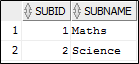
Q3. Create table Exams with following fields.
- ExamDate Date
- RollNo integer 10
- SubId integer 10
- MarksObstained integer 10
- MarksFrom integer 10
First 3 fields will be used as a unique identifier for the record.
Solution:
create table A_Exams(
  ExamDate date,
  RollNo number(10),
  subId number(10),
  marksobtained number(10),
  marksFrom number(10),
  constraints A_Exams_pk primary key
    (ExamDate, RollNo, SubId));
Q4. Create a PL/SQL Procedure SP_Exam_result which should accept exam date as parameter and should create the records for each Student and each Subject in Exams table automatically assuming that all the exams were conducted on the same date. The MarksFrom field should be having value as 100. The MarksObtained field should have random values generated using following function.
ROUND(DBMS_RANDOM.VALUE(30,100))
Solution:
create or replace procedure SP_EXAM_RESULT(p_exam_date in date) as
begin
  for studrec in (select Rollno
                    from A_Students) loop
    for subrec in (select subid
                     from a_subjects) loop
      insert into A_Exams
        (EXAMDATE, ROLLNO, SUBID, MARKSOBTAINED,
         MARKSFROM)
      values
        (p_exam_date, studrec.Rollno, subrec.subid,
         ROUND(DBMS_RANDOM.VALUE(30,100)), 100);
    end loop;

    commit;
  end loop;
end SP_EXAM_RESULT;
Q5. Using SP_Exam_result create exam results for exams date 31-Aug-2018, 30-Nov-2018, 28-Feb-2019 and 15-May-2019. Write calls to SP_Exam_result procedure.
Solution:
begin
  SP_EXAM_RESULT(to_date('31-Aug-2018', 'dd-Mon-yyyy'));
  SP_EXAM_RESULT(to_date('30-Nov-2018', 'dd-Mon-yyyy'));
  SP_EXAM_RESULT(to_date('28-Feb-2019', 'dd-Mon-yyyy'));
  SP_EXAM_RESULT(to_date('15-May-2019', 'dd-Mon-yyyy'));
end;

select * from A_Exams;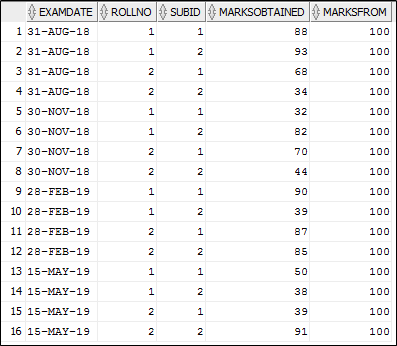
Q6. Write SQL query to generate output as given below for the students by adding up all the marks for the Student for each Subject
| Roll No. | Student Full Name | Subject Name | Marks1 | Marks2 | Marks3 | Marks4 | Total | % |
| 1 | Student One | Subject One | 40 | 60 | 40 | 60 | 200 | 50 |
Solution:
select A.ROLLNO "Roll No.",
       b.fname || ' ' || b.lname "Student Full Name",
       c.subname "Subject Name",
       SUM(DECODE(a.examdate, '31-AUG-18',
                  a.marksobtained, 0))  Marks1,
       SUM(DECODE(a.examdate, '30-NOV-18',
                  a.marksobtained, 0))  Marks2,
       SUM(DECODE(a.examdate, '28-FEB-19',
                  a.marksobtained, 0))  Marks3,
       SUM(DECODE(a.examdate, '15-MAY-19',
                  a.marksobtained, 0))  Marks4,
       sum(a.marksobtained) AS TOTAL,
       avg(a.marksobtained) as "%"
  from A_Exams A
  join A_Students B on a.rollno = b.rollno
  join A_Subjects C on a.subid = c.subid
 group by a.RollNo, a.subid, c.subname,
       b.fname || ' ' || b.lname
 order by a.RollNo, a.subid;

Q7. Store the above out put in a table called Results.
Solution:
create table A_Results as
  select A.ROLLNO "Roll No.",
         b.fname || ' ' || b.lname "Student Full Name",
         c.subname "Subject Name",
         SUM(DECODE(a.examdate, '31-AUG-18',
                    a.marksobtained, 0))  Marks1,
         SUM(DECODE(a.examdate, '30-NOV-18',
                    a.marksobtained, 0))  Marks2,
         SUM(DECODE(a.examdate, '28-FEB-19',
                    a.marksobtained, 0))  Marks3,
         SUM(DECODE(a.examdate, '15-MAY-19',
                    a.marksobtained, 0))  Marks4,
         sum(a.marksobtained) AS TOTAL,
         avg(a.marksobtained) as "%"
    from A_Exams A
    join A_Students B on a.rollno = b.rollno
    join A_Subjects C on a.subid = c.subid
   group by a.RollNo, a.subid, c.subname,
            b.fname || ' ' || b.lname
   order by a.RollNo, a.subid;
Q8. Write a query to find out the total highest mark scorer for each subject.
Solution:
select a."Subject Name", aa."Student Full Name",
       a.Max_total
  from (SELECT "Subject Name",
               MAX(total) Max_total
          FROM A_Results
         group by "Subject Name") a
  join A_Results aa
    on a."Subject Name" = aa."Subject Name"
   and a.Max_total = aa.Total;

In case of any discrepancies or doubts do contact me.
Best of Luck Friends.
 TechOraFAQ
Great. I can really access my knowledge with this
LikeLike