
Q1. How to rebuild the index of a table?
Answer. ALTER INDEX index_name REBUILD;
Q2. What is a Dead Lock?
Answer. When two or more users are waiting for access to data that has been locked by each other, it is known as deadlock. When a deadlock occurs, the transactions fail to go ahead – they are stuck. In such cases, Oracle breaks the deadlock by forcing one or more transactions to rollback.
Q3. What are different types of backup? What are Hot, Cold, logical, Physical backups?
Answer.
Cold Backup: In this type of backup, after the database is shut down, DBA exits the SVRMGR utility and copies the log files, data files and control files onto a backup media. Once the backup has been completed the DBA can restart the database.
Physical Backup: The operating system saves the database files onto tape or some other media. This is useful to restore the system to an earlier point whenever needed.
Logical Backup: In logical backup technique, the IMPORT/EXPORT utilities are used to create the backup of the database. A logical backup backs-up the contents of the database. A logical backup can be used to restore the database to the last backup. However, unlike physical back, it should not be used to create an OS back up copy because restoring using this approach would make it possible to correct the damaged data files. Therefore, in these situations physical backups should be preferred.
Hot backup: A few systems that need to support continuous operation, it is difficult to bring down the database without interrupting the service provided to the users. In such cases, hot backup approach should be used. There are two modes in which the hot backup works.
• ARCHIEVELOG mode
• NOARCHIVELOG mode
Q4. How do you retrieve a dropped table in 10g?
Answer. FLASHBACK table to BEFORE DROP
Q5. What is Explain Plan?
Answer. It is a utility provided that gives the statistics about the performance of the query. It gives information such as number of full table scans occurred, cost, and usage of indexes.
Q6. Explain Drop User Cascade.
Answer. Suppose a user is to be dropped and that user contains some db objects, then it can be dropped using Drop user username cascade; instead of Drop user username;
Q7. How do we tune the Queries?
Answer. Queries can be tuned by checking the logic (table joins), by creating Indexes on fields used in the where clause, by avoiding full table scans. Finally, use the trace utility to generate the trace file, use the TKProf utility to generate a statistical analysis about the query, using which appropriate actions can be taken.
Q8. What is TKProf?
Answer. TKProf is an Oracle database utility used to format SQL Trace output into human readable format.
Q9. Explain Wrap utility of Oracle?
Answer. The wrap utility (wrap.exe) provides a way for PL/SQL developers to protect their intellectual property by making their PL/SQL code unreadable. These encryption options have long been available for other programming languages and were introduced for PL/SQL in version 7.
Unfortunately, there is no such command as: ALTER PACKAGE BODY [name] WRAP;
Instead, the wrap utility takes a readable, ASCII text file as input and converts it to a file containing byte code. The result is that the DBA, developers or anyone with database access cannot view the source code in any readable format.
The command line options for wrap are:- WRAP iname=[file] oname=[file]
Wrap only for production – Wrapping code is desired for production environments but not for profiling. It is much easier to see the unencrypted form of the text in our reports than it is to connect line numbers to source versions. Use dbms_profiler before you wrap your code in a test environment, wrap it, and then put it in production.
Caution – Wrap is a one-way encryption process for the files; there is no un-wrap function. So never throw away your original file. The wrap is done to make sure that someone peeking into the dba_source view will not be able to see the code in clear text.
Q10. What do you mean by SQL * Loader?
Answer. SQL * Loader is the Oracle utility to load data from external data sources like CSV file or fixed data length file.
Example:
Suppose you have Data.csv file with following fields
| EMPNO | INTEGER |
| NAME | TEXT(50) |
| SAL | CURRENCY |
| JDATE | DATE |
CREATE TABLE emp(
   empno number(5),
   name  varchar2(50),
   sal   number(10,2),
   jdate date);

 Create a “LoadData.CTL” file with following content:

 LOAD DATA
 INFILE        ‘D:\Data\emp.csv’
 BADFILE       ‘D:\Data\emp.bad’
 DISCARDFILE   ‘D:\Data\emp.dsc’
 INSERT INTO TABLE emp
 FIELDS TERMINATED BY “,”
 OPTIONALLY ENCLOSED BY ‘”’
 TRAILING NULLCOLS
 (empno, name, sal,
  jdate date ‘mm/dd/yyyy’)
Execute the following command on the command prompt.
D:\Data>sqlldr userid=scott/tiger control=emp.ctl log=emp.log
Q11. What is a directory?
Answer. A directory object specifies an alias for a directory on the server file system where external binary file LOBs (BFILEs) and external table data are located. If “Create Any Directory” privilege is granted to the user, then that user can create directory following command.
CREATE OR REPLACE DIRECTORY bfiledir AS ‘D:\bfiledir’;
Read & Write privileges are required to use the directory. Creator of the directory gets these privileges automatically.
Q12. What is DBLink?
Answer. Database Link is known as DBLink in short form. It is a pointer to a one-way communication path from an Oracle Database server to another database server. It is defined as an entry in a data dictionary table. A client connected to local database A can use a link stored in database A to access information in remote database B, but vice-versa is not possible. For this connection to occur, each database in the distributed system must have a unique global database name in the network domain. Following are the 3 types DBLinks:
• Private: The creator is the owner of this DBLink. Only the owner of a private database link or PL/SQL subprograms in the schema can use this link to access database objects in the corresponding remote database. It is the most secured one.
• Public: “PUBLIC” user is the owner of this DBLink & it is a database wide link. All users and PL/SQL subprograms in the database can use it to access database objects in the corresponding remote database.
• Global: “PUBLIC” user is the owner of this DBLink & it is a network wide link. When an Oracle network uses a directory server, the directory server automatically creates and manages global database links (as net service names) for every Oracle Database in the network. Users and PL/SQL subprograms in any database can use a global link to access objects in the corresponding remote database.
Q13. Can a PL/SQL procedure or function scheduled to be called as a Job from ORACLE db?
Answer. Yes. Packages DBMS_JOB & DBMS_SCHEDULER both are used for scheduling ORACLE jobs in ORACLE db. DBMS_SCHEDULER is robust than DBMS_JOB hence it is recommended to use DBMS_SCHEDULER.
| Create Job | DBMS_SCHEDULER.create_job |
| Run job synchronously | DBMS_SCHEDULER.run_job |
| Stop job | DBMS_SCHEDULER.stop_job |
| Delete Job | DBMS_SCHEDULER.drop_job |
| Jobs Table | dba_scheduler_jobs |
| Create Program | DBMS_SCHEDULER.create_program |
| Drop Program | DBMS_SCHEDULER.drop_program |
| Program Table | dba_scheduler_programs |
Q14. What is Pivot? Give examples.
Answer. PIVOT takes data in separate rows, aggregates it and converts it into columns.
Example:
CREATE TABLE pivottest (
   id            NUMBER,
   customer_id   NUMBER,
   product_code  VARCHAR2(5),
   quantity      NUMBER);

 INSERT INTO pivottest VALUES (1, 1, 'A', 10);
 INSERT INTO pivottest VALUES (2, 1, 'B', 20);
 INSERT INTO pivottest VALUES (3, 1, 'C', 30);
 INSERT INTO pivottest VALUES (4, 2, 'A', 40);
 INSERT INTO pivottest VALUES (5, 2, 'C', 50);
 INSERT INTO pivottest VALUES (6, 3, 'A', 60);
 INSERT INTO pivottest VALUES (7, 3, 'B', 70);
 INSERT INTO pivottest VALUES (8, 3, 'C', 80);
 INSERT INTO pivottest VALUES (9, 3, 'D', 90);
 INSERT INTO pivottest VALUES (10, 4, 'A', 100);
 COMMIT;

 SELECT *
   FROM (SELECT product_code, quantity
           FROM pivottest)
  PIVOT (SUM(quantity) AS sum_quantity
    FOR (product_code) IN ('A' AS a, 'B' AS b, 'C' AS c));
 Or
 SELECT SUM(DECODE(product_code, 'A', quantity, 0)) AS a_sum_quantity,
        SUM(DECODE(product_code, 'B', quantity, 0)) AS b_sum_quantity,
        SUM(DECODE(product_code, 'C', quantity, 0)) AS c_sum_quantity
   FROM pivottest
ORDER BY customer_id;| A_SUM_QUANTITY | B_SUM_QUANTITY | C_SUM_QUANTITY |
| 210 | 90 | 160 |
SELECT *
   FROM (SELECT customer_id, product_code, quantity
           FROM pivottest)
  PIVOT (SUM(quantity) AS sum_quantity
    FOR (product_code) IN ('A' AS a, 'B' AS b, 'C' AS c))
  ORDER BY customer_id;
 Or
 SELECT customer_id,
        SUM(DECODE(product_code, 'A', quantity, 0)) AS a_sum_quantity,
        SUM(DECODE(product_code, 'B', quantity, 0)) AS b_sum_quantity,
        SUM(DECODE(product_code, 'C', quantity, 0)) AS c_sum_quantity
   FROM pivottest
  GROUP BY customer_id
ORDER BY customer_id;| CUSTOMER_ID | A_SUM_QUANTITY | B_SUM_QUANTITY | C_SUM_QUANTITY |
| 1 | 10 | 20 | 30 |
| 2 | 40 | 50 | |
| 3 | 60 | 70 | 80 |
| 4 | 100 |
Q15. What is UnPivot? Give examples.
Answer. UNPIVOT converts column-based data into separate rows. It is opposite of Pivot.
Example:
CREATE TABLE unpivottest (
  id              NUMBER,
  customer_id     NUMBER,
  product_code_a  NUMBER,
  product_code_b  NUMBER,
  product_code_c  NUMBER,
  product_code_d  NUMBER
);

INSERT INTO unpivottest VALUES (1, 101, 10, 20, 30, NULL);
INSERT INTO unpivottest VALUES (2, 102, 40, NULL, 50, NULL);
INSERT INTO unpivottest VALUES (3, 103, 60, 70, 80, 90);
INSERT INTO unpivottest VALUES (4, 104, 100, NULL, NULL, NULL);
COMMIT;

 SELECT *
   FROM unpivottest
UNPIVOT INCLUDE NULLS (quantity
        FOR product_code
        IN (product_code_a AS 'A', product_code_b AS 'B',
            product_code_c AS 'C', product_code_d AS 'D'));
-----Or----
SELECT id,
       customer_id,
       DECODE(unpivot_row, 1, 'A',
                           2, 'B',
                           3, 'C',
                           4, 'D',
                           'N/A') AS product_code,
       DECODE(unpivot_row, 1, product_code_a,
                           2, product_code_b,
                           3, product_code_c,
                           4, product_code_d,
                           'N/A') AS quantity
  FROM unpivottest,
       (SELECT level AS unpivot_row
          FROM dual
       CONNECT BY level <= 4)
ORDER BY 1,2,3;| ID | CUSTOMER_ID | PRODUCT_CODE | QUANTITY |
| 1 | 101 | A | 10 |
| 1 | 101 | B | 20 |
| 1 | 101 | C | 30 |
| 1 | 101 | D | |
| 2 | 102 | A | 40 |
| 2 | 102 | B | |
| 2 | 102 | C | 50 |
| 2 | 102 | D | |
| 3 | 103 | A | 60 |
| 3 | 103 | B | 70 |
| 3 | 103 | C | 80 |
| 3 | 103 | D | 90 |
| 4 | 104 | A | 100 |
| 4 | 104 | B | |
| 4 | 104 | C | |
| 4 | 104 | D |
Q16. What is Merge?
Answer. The MERGE statement is used to conditionally insert or update or delete records depending on their presence. it reduces table scans and can perform the operation in parallel if required. Using clause can be used with Tables, Views, Queries
MERGE INTO employees e
  USING hr_records h
     ON (e.id = h.emp_id)
  WHEN MATCHED THEN
    UPDATE SET e.address = h.address
     Where h.address is not null
    DELETE where h.status = ‘Invalid’
  WHEN NOT MATCHED THEN
    INSERT (id, address)
    VALUES (h.emp_id, h.address)
     Where h.address is not null;

MERGE INTO employees e
  USING (SELECT *
           FROM hr_records
          WHERE start_date > ADD_MONTHS(SYSDATE, -1)) h
     ON (e.id = h.emp_id)
  WHEN MATCHED THEN
    UPDATE SET e.address = h.address
     Where h.address is not null
    DELETE where h.status = ‘Invalid’
  WHEN NOT MATCHED THEN
    INSERT (id, address)
    VALUES (h.emp_id, h.address)
     Where h.address is not null;
Q17. JavaScript Object Notation (JSON) support.
Answer. JSON is stored in CLOB field & following check constraint can be applied to that field.
CREATE TABLE Orders_J
  (id            Number NOT NULL,
   date_created  TIMESTAMP WITH TIME ZONE,
   Order_Details CLOB
   CONSTRAINT Chk_Order_json CHECK(Order_Details IS JSON));

INSERT INTO Orders_J
VALUES (SYS_GUID(),
        SYSTIMESTAMP,
        '{"OrdNumber"              : 1600,
          "Ref_number"             : "KOOL20140421",
          "User_Name"              : "KOOL",
          "CostCenter"             : "A50",
          "OtherDetails"           :
          {"Name"    : "Albert Sulu",
           "Address" : {"street"  : "20 Speeding Lawns",
                        "city"    : "Banglore",
                        "state"   : "Karnataka",
                        "zipCode" : 560400,
                        "country" : "India"},
                        "Phone"   : [{"type"   : "Office",
                                      "number" : "9876543210"},
                                     {"type"   : "Mobile",
                                      "number" : "9988776655"}]},
           "AdditionalInstructions" : null,
           "OrderItems"             : […]}');

SELECT o.Order_Details.OrdNumber,
       o.Order_Details.OtherDetails.Address.Phone.Mobile
  FROM Orders_J o;

JSON Dot-Notation Query Compared With JSON_VALUE

SELECT o.OtherDetails.OrdNumber
  FROM Orders_J o;

SELECT json_value(OtherDetails,
                  '$.OrdNumber')
  FROM Orders_J;

JSON Dot-Notation Query Compared With JSON_QUERY

SELECT o.OtherDetails.Address.Phone
  FROM Orders_J o;

SELECT json_query(OtherDetails,
                  '$.Address.Phone)
  FROM Orders_J;

SELECT o.OtherDetails.Address.Phone.type
  FROM Orders_J o;

SELECT json_query(OtherDetails,
                  '$.Address.Phone.type'
                  WITH WRAPPER)
  FROM Orders_J;
Q18. XML data generation?
Answer. Data in the tables can be converted into XML as shown in following examples.
SELECT XMLElement("Emp",
                   XMLElement("name", e.first_name ||' '|| e.last_name),
                   XMLElement("hiredate", e.hire_date)) AS "RESULT"
  FROM hr.employees e
WHERE employee_id > 200;| RESULT |
| <Emp><name>Michael Hartstein</name><hiredate>2004-02-17</hiredate></Emp> |
| <Emp><name>Pat Fay</name><hiredate>2005-08-17</hiredate></Emp> |
| <Emp><name>Susan Mavris</name><hiredate>2002-06-07</hiredate></Emp> |
| <Emp><name>Hermann Baer</name><hiredate>2002-06-07</hiredate></Emp> |
| <Emp><name>Shelley Higgins</name><hiredate>2002-06-07</hiredate></Emp> |
| <Emp><name>William Gietz</name><hiredate>2002-06-07</hiredate></Emp> |
SELECT XMLElement("Emp",
                  XMLAttributes(e.first_name ||' '||
                                e.last_name AS "name"),
                  XMLForest(e.hire_date, e.department AS "department")
                  ) AS "RESULT"
  FROM employees e
WHERE e.department_id = 20;| RESULT |
| <Emp name=”Michael Hartstein”> <HIRE_DATE>2004-02-17</HIRE_DATE> <department>20</department> </Emp> |
| <Emp name=”Pat Fay”> <HIRE_DATE>2005-08-17</HIRE_DATE> <department>20</department> </Emp> |
Q19. What are Hints?
Answer. Hints are used with SQL statements to optimize them by altering the execution plan. Hints allow you to decide on the execution plan which is otherwise being taken care of by the optimizer. It works with Select, Insert, Update, Delete & Merge. Hints are to be encapsulated in /*+ [Hint] */ or has to start with –+ as shown in below examples.
SELECT /*+ LEADING(e2 e1) USE_NL(e1) INDEX(e1 emp_emp_id_pk) USE_MERGE(j) FULL(j) */
        e1.first_name, e1.last_name, j.job_id, sum(e2.salary) total_sal
   FROM employees e1, employees e2, job_history j
  WHERE e1.employee_id = e2.manager_id
    AND e1.employee_id = j.employee_id
    AND e1.hire_date = j.start_date
  GROUP BY e1.first_name, e1.last_name, j.job_id
  ORDER BY total_sal;

 SELECT --+ LEADING(e2 e1) USE_NL(e1) INDEX(e1 emp_emp_id_pk) USE_MERGE(j) FULL(j)
        e1.first_name, e1.last_name, j.job_id, sum(e2.salary) total_sal
   FROM employees e1, employees e2, job_history j
  WHERE e1.employee_id = e2.manager_id
    AND e1.employee_id = j.employee_id
    AND e1.hire_date = j.start_date
  GROUP BY e1.first_name, e1.last_name, j.job_id
  ORDER BY total_sal;
Q20. What are Collections?
Answer. A Collection is an ordered group of elements of same data types. It can be a collection of simple data type or complex data type. Each element in collection is identified by unique “subscript”. Using subscript, the data in collection can be read or wrote. Following are the 3 types of collections
VArray: The size of the array is fixed. The array size cannot exceed its fixed value. The subscript of the VArray is of a numeric value. Following are the attributes of VArray.
- Upper limit is fixed.
- Populated sequentially starting with the subscript ‘1’.
- It is always dense, i.e. we cannot delete any array elements randomly. It can be deleted as a whole, or it can be trimmed from the end.
- Since it always is dense in nature, it has very less flexibility.
- It is more appropriate to use when the array size is known and to perform similar activities on all the array elements.
- They need to be initialized before using them in programs. Any operation (except EXISTS operation) on an uninitialized collection will throw an error.
- It can be created as a database object, which is visible throughout the database or inside the subprogram, which can be used only in that subprogram.
Syntax for VArray: TYPE IS VArray () OF ;
Nested Table: The size of the array is not fixed. It has the numeric subscript type. Following are the attributes of nested table.
- No upper limit.
- Memory needs to be extended each time before we use it.
- Populated sequentially starting with the subscript ‘1’.
- It can be of both dense and sparse, i.e. It can be created as dense, and deletion of individual array element randomly is permitted, which makes it sparse.
- It is stored in the system generated database table and can be used in the select query to fetch the values.
- They need to be initialized before using them in programs. Any operation (except EXISTS operation) on the uninitialized collection will throw an error.
- It can be created as a database object, which is visible throughout the database or inside the subprogram, which can be used only in that subprogram.
Syntax for Nested Table: TYPE IS TABLE OF ;
Index-by-table: Also known as Associative arrays. The size of the array is not fixed. Subscript can be integer or string. Following are the attributes of index-by-table.
- Subscript can be integer or string. At the time of creation, the subscript type should be mentioned.
- No upper limit.
- Not stored sequentially.
- Sparse in nature.
- They need not be initialized before using them.
- BULK COLLECT cannot be used with this collection type, as the subscript is to be given explicitly for each record in the collection.
- It cannot be created as a database object. It can only be created & used inside the subprogram.
Syntax for Index-by-Table: TYPE IS TABLE OF INDEX BY VARCHAR2 (10);
Q21. Explain Pipelined Function.
Answer. Pipelined function is a function that produces the data and the produced data is available for consumption directly without storing it in other table or cache. Pipelined function can be used in From clause of a Select statement.
Q22. How to create statistics in Oracle DB?
Answer. ANALYZE command can gather statistics for 1 table, index or cluster.
Examples:
ANALYZE table scott compute statistics;
ANALYZE table scott estimate statistics sample 25 percent;
ANALYZE table scott estimate statistics sample 1000 rows;
ANALYZE index sc_idx compute statistics;
ANALYZE index sc_idx validate structure;
Note: Analyze is available for all versions but following commands should be used instead.
DBMS_UTILITY.ANALYZE_SCHEMA can gather statistics for all the tables, clusters or indexes of a schema. Available only for versions 7.3.4 and 8.0.
Examples:
EXEC DBMS_UTILITY.ANALYZE_SCHEMA(‘SCOTT’, ‘COMPUTE’);
EXEC DBMS_UTILITY.ANALYZE_SCHEMA(‘SCOTT’, ‘ESTIMATE’, estimate_rows => 1000);
EXEC DBMS_UTILITY.ANALYZE_SCHEMA(‘SCOTT’, ‘ESTIMATE’, estimate_percent => 25);
EXEC DBMS_UTILITY.ANALYZE_SCHEMA(‘SCOTT’, ‘DELETE’);
EXEC DBMS_UTILITY.ANALYZE_DATABASE(‘COMPUTE’); –analyzes the whole database.
DBMS_STATS.GATHER_SCHEMA_STATS available from Oracle 8i and above.
Examples:
EXEC DBMS_STATS.GATHER_SCHEMA_STATS(‘SCOTT’, DBMS_STATS.AUTO_SAMPLE_SIZE);
EXEC DBMS_STATS.GATHER_SCHEMA_STATS(ownname=>’SCOTT’,
estimate_percent=>DBMS_STATS.AUTO_SAMPLE_SIZE);
EXEC DBMS_STATS.gather_schema_stats(ownname => ‘SCOTT’, estimate_percent => 25);
EXEC DBMS_STATS.gather_table_stats(‘SCOTT’, ‘EMPLOYEES’);
EXEC DBMS_STATS.gather_index_stats(‘SCOTT’, ‘EMPLOYEES_PK’);
EXEC DBMS_STATS.DELETE_SCHEMA_STATS(‘SCOTT’); –analyzes the whole database.
Q23. Explain Table Function.
Answer. A collection type instance is returned by Table function. It can be queried like a table by calling the function in the FROM clause of a query. Table function uses the TABLE keyword. It returns rows to the calling query & produces data in the desired form before the function execution is completed.
Create or replace type Test_Type as table of VarChar2(500);

create or replace Function LstToTbl(plist in varchar2,
                                    delimiter in char default ',')
                                    return Test_Type pipelined as
  l_string      LONG := plist || delimiter;
  l_comma_index pls_integer;
  l_index       pls_integer := 1;
begin
  Loop
    l_comma_index := instr(l_string, delimiter, l_index);
    exit when l_comma_index = 0;
    pipe row (substr(l_string, l_index, l_comma_index - l_index));
    l_index := l_comma_index + 1;
  end loop;
  Return;
end LstToTbl;

Implementation of above code is as follows.

select column_value
  from Table(
LstToTbl(‘FirstName,LastName,Address1,Address2,City,400101,05-05-2001’));| Column_Value |
| FirstName |
| LastName |
| Address1 |
| Address2 |
| City |
| 400101 |
| 05-05-2001 |
Q24. Explain Recycle Bin.
Answer. From Oracle 10g dropped tables & it’s associated objects like indexes, constraints, etc. are moved to recycle bin, and can be restored from there. The objects moved to recycle bin continues to occupy disk space.
| ALTER SYSTEM SET recyclebin = ON; | The recycle bin is enabled. |
| ALTER SYSTEM SET recyclebin = OFF; | The recycle bin is disabled. |
| ALTER SESSION SET recyclebin = ON; | The recycle bin is enabled for a session. |
| ALTER SESSION SET recyclebin = OFF; | The recycle bin is disabled for a session. |
| SHOW RECYCLEBIN or SELECT * FROM RECYCLEBIN; or SELECT * FROM USER_RECYCLEBIN; | To see the objects in the recycle bin. |
| PURGE TABLE test; | Dropping the table without sending it to recycle bin. |
| Purge Recyclebin; | To remove all dropped objects from the recycle bin for current user. |
| PURGE DBA_RECYCLEBIN; | To remove all dropped objects from the recycle bin for the entire system. |
| PURGE TABLE t1; | To purge table in recycle bin individually. |
Q25. Suppose a table is loaded with 10K+ records every day using ETL process, after truncating the existing records from it. At the end of every 30 days, the averages are required to be calculated of the data that has been uploaded during these last 30 days. How will you get this done?
Answer. Create a new table to store the required calculated averages of the data uploaded in the table every day. At the end of the 30 day you will have 30 records of calculated averages. Use these records and calculate the average once again & you will get the required average calculated for the data that has been uploaded during last 30 days.
Q26. Explain Hierarchical Queries.
Answer. Use “Connect By”, “Prior”, “level” & “Start With” keywords to write hierarchical queries as shown in the example below.
 select lpad(' ', (level - 1) * 2, ' ')||
        first_name||' '||last_name as Employee_Name,
        employee_id, manager_id,
        case
          when manager_id is null then null
          else prior first_name||' '||last_name
        end as Manager_Name, level
   from Employees
connect by prior employee_id = manager_id
  start with manager_id is null
  order siblings by first_name||' '||last_name;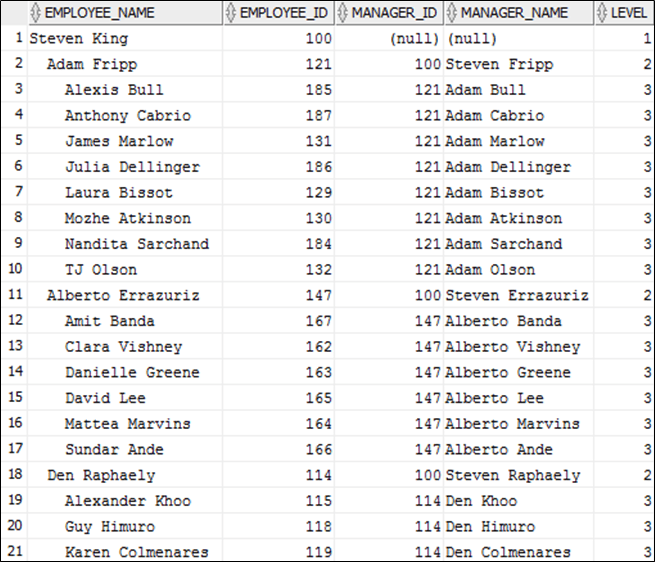
Q27. What is SQL injection / SQLI?
Answer. SQL injection / SQLI is a hacking technique that enables a user to inject SQL commands in the database from a vulnerable application. By injecting extra SQL commands, the attacker can extract sensitive information to get control over the database. This security issue can exist in website & in software, where a database is used, and user input is not sanitized correctly before integrating it with the SQL statements issued by these vulnerable applications.
Categories
1. Classic Attack
Most attacks rely on basic SQL manipulation and are classic attacks. It includes WHERE clause modification, UNION operator injection and query stacking. Those are by far the most popular kinds of SQLIA and they are explained in the SQL injection tutorial.
2. Inference attack
Inference attacks involve a SQL manipulation that will provide the hacker the ability to verify a true / false condition. Depending on the database system reaction, it is possible to find out if the condition was realized or not. This information gathering technique is covered in the blind SQL injection article.
3. DBMS specific attack
This type of SQLIA is used as an alternative to classic SQL injection. It is especially useful when trying to fingerprint the database system, but it can also provide the ability to achieve a complete attack when some conditions are met. These techniques are detailed in the advanced SQL injection section.
Dynamic Query Building
It is important to mention that SQL injection vulnerabilities are not caused by a database system flaw. In fact, a SQL injection attack can be made against a vulnerable system no matter what its DBMS is. The security flaw is an error made by the programmer who built a query without sufficiently validating user input.
Popularity
SQL injection attacks are among the most popular security issues today. The presence of transactional websites combined to the misunderstanding of SQL injection clearly contributed to increase the problem. In fact, it has created a perfect environment for the growth of SQL injection attacks.
Security Impacts
Misinformation about possible impacts and causes of SQL injection are so generalized that it is important to make a clear distinction between myths and reality. It is often thought that this kind of attack is pretty limited in terms of possible damage and it achievability mainly relies on luck since it requires a lot of guessing to find enough information to perform an attack. The truth is totally the opposite. By using the right techniques, the attacker will be able to exploit almost any SQL injection flaw without relying on luck or guessing. Moreover, a SQL injection attack can lead to a full system control of the database server. Obviously, this is without mentioning that database content can be read, modified and deleted by the hacker who has gain some access to the database.
Q28. Give the output of the following statement. Is this style of coding safe?
select &a from &b where &c = &d;
| Variable | Value |
| a | employee_id, first_name, last_name |
| b | Employees |
| c | last_name |
| d | ‘King’ |
Answer. The above query will result into extraction of record consisting of details like Employee_ID, First_Name, Last_Name from Employees table whose last_name is “King”.
Such queries written in programs can be exposed to SQL INJECTION is not implemented with proper care. Replacing the value of variable d as shown below can result into exposing sensitive data to the hackers.
| Variable | Value |
| d | ‘King’ union select null, username, password from dba_users |
Q29. What is an Object Type?
Answer. OOPs can be implemented in Oracle DB using Object Type. An Object type can be created only at the schema level. Once it is created in the schema, then the same can be used in subprograms. It can be created as shown below.
create type emp_obj as object(
  emp_no number,
  emp_name varchar2(50),
  salary number,
  manager number,
  constructor function emp_obj(p_emp_no number, p_emp_name varchar2,
                               p_salary number) return self as result),
  member procedure create_rec,
  member procedure disp_rec);

create or replace type body emp_obj as
  constructor function emp_obj(p_emp_no number, p_emp_name varchar2,
                               p_salary number) return self as result is
  begin
    dbms_output.put_line(’Start Constructor..');
    self.emp_no := p_emp_no;|
    self.emp_name := p_emp_name;
    self.salary := p_salary;
    self.managerial := 1001;
    return;
  end:

  member procedure create_rec is
  begin
    insert into emp values(emp_no, emp_name, salary, manager);
  end;

  member procedure disp_rec is
  begin
    dbms_output.put_line('Emp Name:' || emp_name ||
                         ' Emp No.:' || emp_no ||
                         ' Salary':' || salary ||
                         ' Manager:' || manager);
  end:
end:
In case of any discrepancies or doubts do contact me.
Best of Luck Friends.


Good work. Very helpful. Appreciate the efforts of the author.
LikeLike
Realy helpful information
LikeLike
Yes Sir Very Useful
LikeLike